
I Built an AI Chatbot in a Few Days. Here's What I Learned About RAG
Photo by Malcolm Lightbody on Unsplash
It’s dangerous to go alone! Take this.
So you want to ‘learn AI’, but have no idea where to begin. Welcome! I think a lot of people are making this AI stuff sound a lot more difficult than it really is. I don’t have the psychology degrees or the time to unpack that right now, but what I do have is a tiny bit of knowledge that could help kickstart your journey.
To me, there are two main categories of AI that people are referring to when they talk about learning AI.
- AI Coding Assistants (eg. Claude Code, Cursor, GitHub Copilot, etc.). Tools that can help you generate code.
- Building AI systems / agentic applications. (eg. chatbots, deploying LLMs, etc.) Applications that use agents, LLMs, etc to get things done.
I have a few blog posts if you want to get started with using AI coding assistants. Here, I’ll focus more on the second category and give a high-level overview of what I learned.

I love using toy projects to dive into learning new tech for a ton of reasons, but that’ll be for another blog post. A few weeks ago, I knew I wanted to start learning about AI systems but wasn’t entirely sure what to even start searching for. One use of AI I see all the time is AI chatbots that have access to a company’s documentation - think of a customer service chatbot that can answer questions about return policies, your order, etc. Yes, chatbots are usually awful and frustrating, but that means the bar is pretty low to build something semi-impressive! With that, I decided I’d build one. I had a vague understanding that RAG was probably a good topic to search for, and I had heard of LangChain, so I did some quick googling and got started. I also built a Claude Skill that I called my “langchain-tutor” and instructed it to never give me code, only to serve as a tutor and explain, teach, and guide me to write the code myself.
Almost all my side projects revolve around old school dungeons and dragons and TTRPGs, and this one would be no different. I found a github repo with the rules for Old School Essentials (a retro-clone of B/X D&D) in markdown format. Perfect! I’d create a chatbot that had the rules as it’s knowledge and could answer questions about it. Seemed simple enough.
The Problem that RAG Solves
You may have needed to ask a chatbot like Gemini or ChatGPT about a document before. Maybe you wrote a rough draft of something, pasted it into GPT and asked it to make some edits for clarity. That’s fine for small documents, but it can’t work for entire knowledge-bases like your company’s customer service policies or the D&D rules that I’m using. The reason it won’t work is partially due to context windows. If you give the chatbot too many documents to serve as its knowledge, the context window will fill up and you’ll either get hallucinations or you just won’t be able to prompt it at all.
From the Claude docs:
“The “context window” refers to the entirety of the amount of text a language model can look back on and reference when generating new text plus the new text it generates. This is different from the large corpus of data the language model was trained on, and instead represents a “working memory” for the model.” So if you paste the entire ruleset for D&D into Gemini and then ask it a question like “How much fall damage does a character take when falling 30 ft?”, its context window may be too full for it to even answer.”
My Thought Process
👨🏻💻 Obviously when you chat with a customer service bot, it’s built into the company’s website, not just a Gemini Gem. Even if I build a custom chat bot, I can’t just add the docs as part of the prompt each time, because the context window will fill up.
👨🏻💻 Hmm what if I just put the docs in a folder and tell the chatbot to reference those for its answers?
🧠 Nope, that’s the same issue - how would the agent know where to look in the docs unless it loaded them all into context? We’re still encountering context window problem!
👨🏻💻 It’s like the agent needs a table of contents to search so it only loads the necessary knowledge for each question.
This is sort of what RAG solves. RAG is how you given an LLM access to a custom knowledge base of information and allow it to use that data to respond to prompts without filling up the context window.
How RAG Works
Here’s my shot at explaining RAG so you know what to start learning:
You have your data - for us, it’s the D&D ruleset I mentioned earlier. First, you need to build an “ingestion pipeline”. Sounds scarier than it is, but all you’re really doing is taking your document and splitting it up into small pieces. No AI is involved here - you’re just running some code that takes your doc and splits it up into pieces (called “chunks”) so that when someone asks a question like “How much fall damage does a character take when falling 30 ft.?”, the agent only has to load the chunk that has the rules on fall damage.
So instead of loading all the knowledge at once, which would overwhelm the context window, we’re only going to load the relevant chunks. We’re also actually going to use two models - one to find the relevant chunks, and one to look at that data and the user’s prompt and figure out how to respond to them.
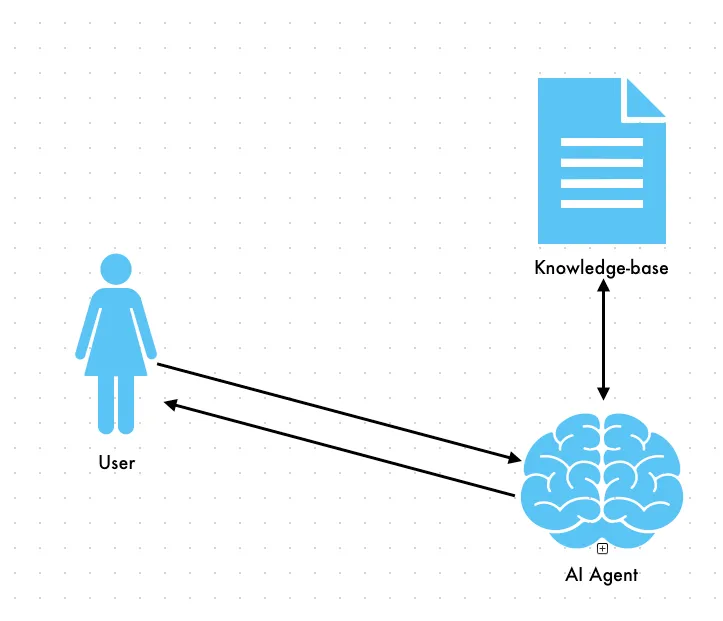
Attempting to load all the data will likely fill your context window
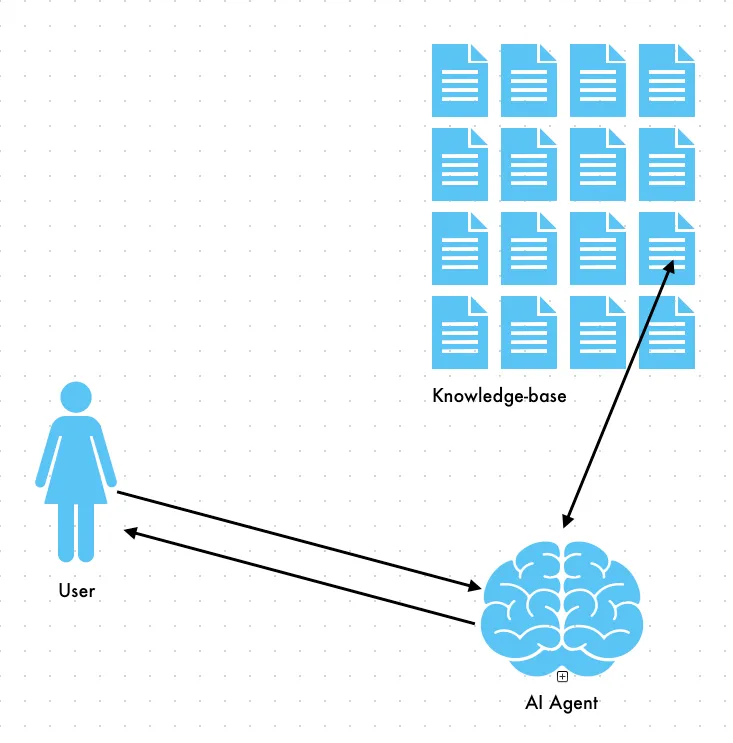
Loading only the chunks where we think the data is will prevent the context window from getting filled
Ok, but how does the agent know which chunk to find the answer in? That’s where things start to get interesting. When we split the docs into chunks, we also have another step. It’s great that it’s all split up now, but the agent still doesn’t know what chunks are relevant to each prompt. We can’t just let it read each chunk, because that would put us right back at the same ‘context window problem’ we discussed earlier. After we split the doc into chunks, we involve an AI model for the first time. We need an embedding model to convert text into vectors. Vectors are the model’s way of understanding the content inside each chunk. How a model takes human text and turns it into vectors is a bit of a black box, but it’s ok to just assume it’s magic 🪄 here.
At this point we’ve split the doc into chunks and used an embedding model to convert each chunk into vectors and store it in a vector store (in my case, I just saved it to a file on disk, but this is where you could also involve something like Supabase). That was all done as part of the ingestion pipeline - getting the docs ready for retrieval. (That’s most of the jargon we’ll cover, I promise.) All the hard work is done. So we have the doc split up into manageable pieces and the model knows what’s in each chunk, but how does it know which chunks are relevant to a user’s prompt? When a user prompts the chatbot, the embedding model (the same one we used to vectorize the doc) converts the user’s prompt into a vector embedding. These vectors are then used to search our vector store for similar documents. To grossly oversimplify - the model converts the user prompt to numbers and then looks for the chunk that has numbers that match it most closely. Once the embedding model finds the relevant chunks (you’ll usually have it return multiple matches), it then hands that data to another model - this model is the one that will actually answer the user.
A quick overview:
- Ingestion pipeline - only has to run once, or when data changes a. Split doc(s) into smaller chunks b. Use an embedding model to turn those chunks into vector embeddings c. Save those embeddings in a vector store (on disk, in a database, etc.)
- Retrieval a. User provides a prompt b. Embedding model (same model we used during ingestion) converts the prompt into a vector embedding c. That vector embedding is used in a ‘similarity search’ - think of it as asking the vector store ‘which chunk’s numbers are closest to this prompt’s numbers?’
- The LLM uses the results from the similarity search to generate an answer, which gets sent back to the user
So what does all this stuff get us?! Well, let’s look at the system prompt I gave the LLM. This is what the LLM (step 3) receives. The ‘context’ here is the chunks of data returned by the embedding model. It also receives the entire chat history (a topic for another post) as well as the original prompt from the user.
You are the Grimoire Oracle, a TTRPG rules assistant. Answer questions using ONLY the context provided below.

IMPORTANT: If the context does not contain the answer, say "I couldn't find that information in the rules." Do NOT make up or invent any rules, numbers, or game mechanics.

Context:
{context}
The LLM looks at the user’s prompt, the chunks of data where the relevant data should be, and formulates an answer. If it doesn’t find the answer in the data/context given to it, it should respond with “I couldn’t find that information in the rules.”
Here’s a recording of the chatbot in action:
I’m sure I could be doing a ton of things better in the project where I set up a chatbot using a local model (Ollama), but here’s where you can find that code.
Grimoire Oracle - Local LLM chatbot with knowledge of Old School Essentials / B/X D&D
Your Challenge
I went from having no idea how any of this worked or what to even search for, to now having built my own RAG chatbot and more importantly - having a list of new things to dive into further. I already had to solve issues like how to get good results from the similarity search, how to debug chatbot problems, preventing hallucinations, etc. I also have that list of keywords that I discovered, each of which probably has it’s own area of expertise that I can now uncover.
-
Start with Scrimba’s LangChain tutorial (Learn LangChain.js) I liked this much better than the official LangChain tutorial I did, although you can start wherever you’d like. However, I didn’t go over this tutorial until after I built my own, so don’t feel that this is a prerequisite.
-
Build your own chatbot! Pick a dataset you’re interested in (your favorite book, game rules, etc). Use commercial chatbots like Gemini, Claude, etc as a pair programmer - ask them questions, have them explain concepts, just don’t let them generate too much code for you while you’re trying to learn. (Claude Code even has a learning output style you can use here.)
-
Write down topics to dive into further You’ll hit problems that you need to solve right away, like getting poor results from similarity search, but other things you can defer until later, like adding a “history” to your chatbot so it remembers your previous prompts, deploying, switching models, etc. Stick to a local Ollama model for now. It’s surprisingly capable for this.
The bar is pretty low here. A working RAG chatbot that reliably answers questions about your data is genuinely impressive. More importantly, you’ll have built something real, learned the vocabulary, and discovered exactly what you want to learn next.
You don’t need the perfect framework, the best embedding model, a background in computer science, or a PhD in ML. You just need to start building and be willing to learn when things inevitably break.
Go pick your data and have fun building something.